
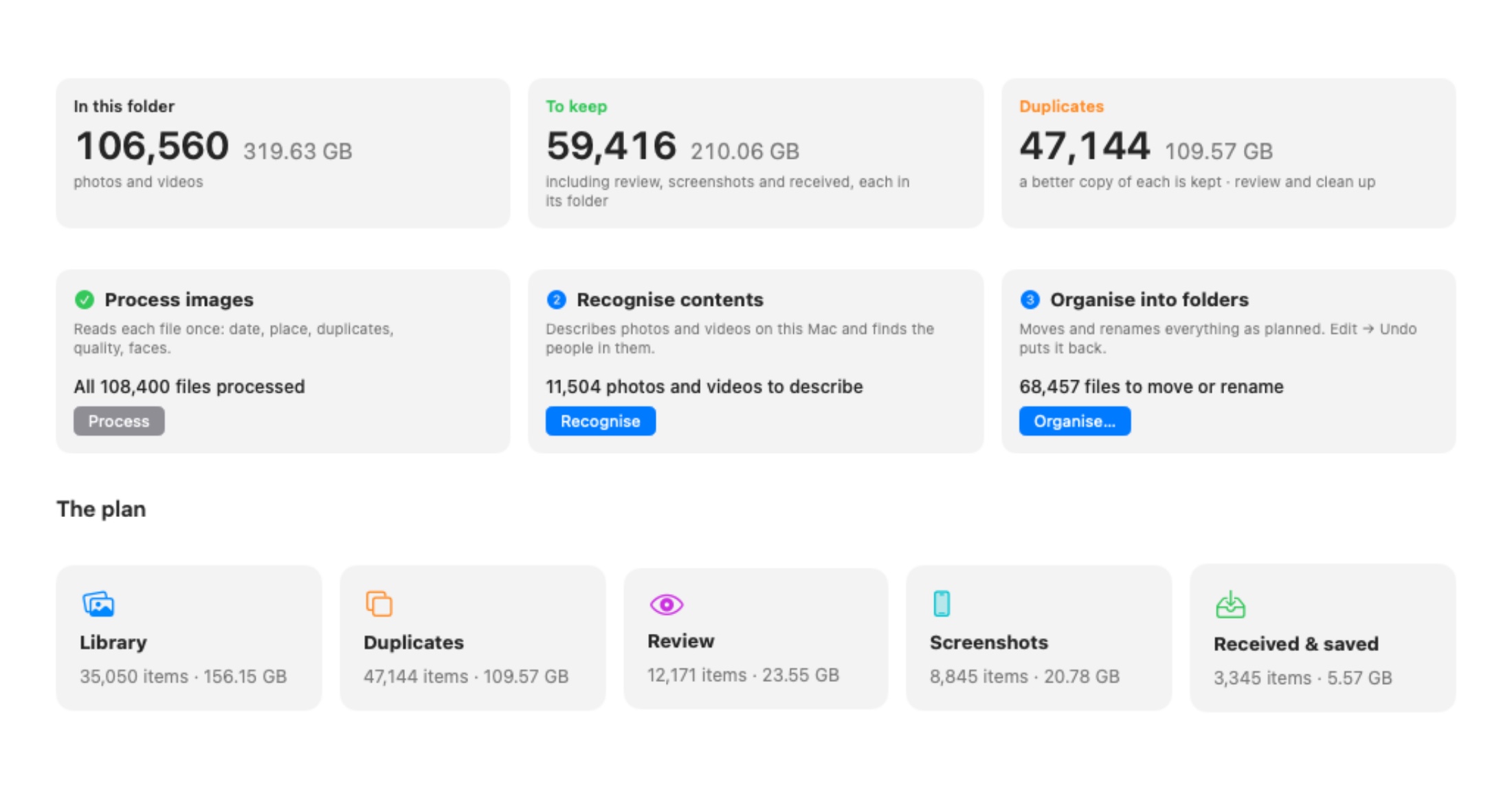
My wife has had an iPhone for about ten years, and for all of them the backup plan was the same: when the phone got full, plug it into a computer, copy everything to an external drive, delete it from the phone. Each time into a new folder with whatever name made sense that day: poze/2015, _iphone 08.18, Fotos iphone 2017, Desktop/photos. When I finally sat down with the drive, it held more than 100,000 of her photos and videos, 320 GB, with the same pictures copied two or three times, screenshots mixed in with holidays, and nothing you could actually find.
We didn’t want to upload all of that to a cloud service to get it sorted. We wanted plain folders on a drive we own, sorted by date and place, and nothing leaving the house. So I asked Claude Code what it could build for that, with one condition: all the tooling had to run locally.
What I asked for
- group photos by place, with trips in their own folders,
- find duplicates and keep the best copy,
- get screenshots out of the way,
- put the clearly bad ones (blurry, too dark, photos of documents) in a folder to review,
- give files names that say what’s in them,
- use Apple’s own image recognition, no API calls.
Its answer was a native Mac app in Swift instead of a pile of Python scripts, because Swift can call Apple Vision, the hardware image decoder and the GPU directly. The app ended up being called PhotoSma.
Reading a spinning disk only once
The library lives on a 2.5″ USB hard drive, which reads at about 105 MB/s at best and much slower when it has to jump around. That shaped the whole design:
- One sequential reader. Each file is read from the drive once, hashed, and shrunk to a preview on the Mac’s internal SSD. Several readers in parallel would make a spinning disk slower, not faster.
- Everything else runs from the SSD. Apple Vision on the Neural Engine (labels, faces, a fingerprint per image), sharpness and exposure on the GPU, and duplicate matching on the GPU too.
- An index in the folder itself. A SQLite file inside a hidden
.photosortfolder keeps everything the app learned, so a run can be stopped at any time and picks up where it left off. - Nothing gets deleted. The app first shows what it would do with every file. Organise then moves and renames inside the same drive, and Undo puts the last batch back.
Where everything goes
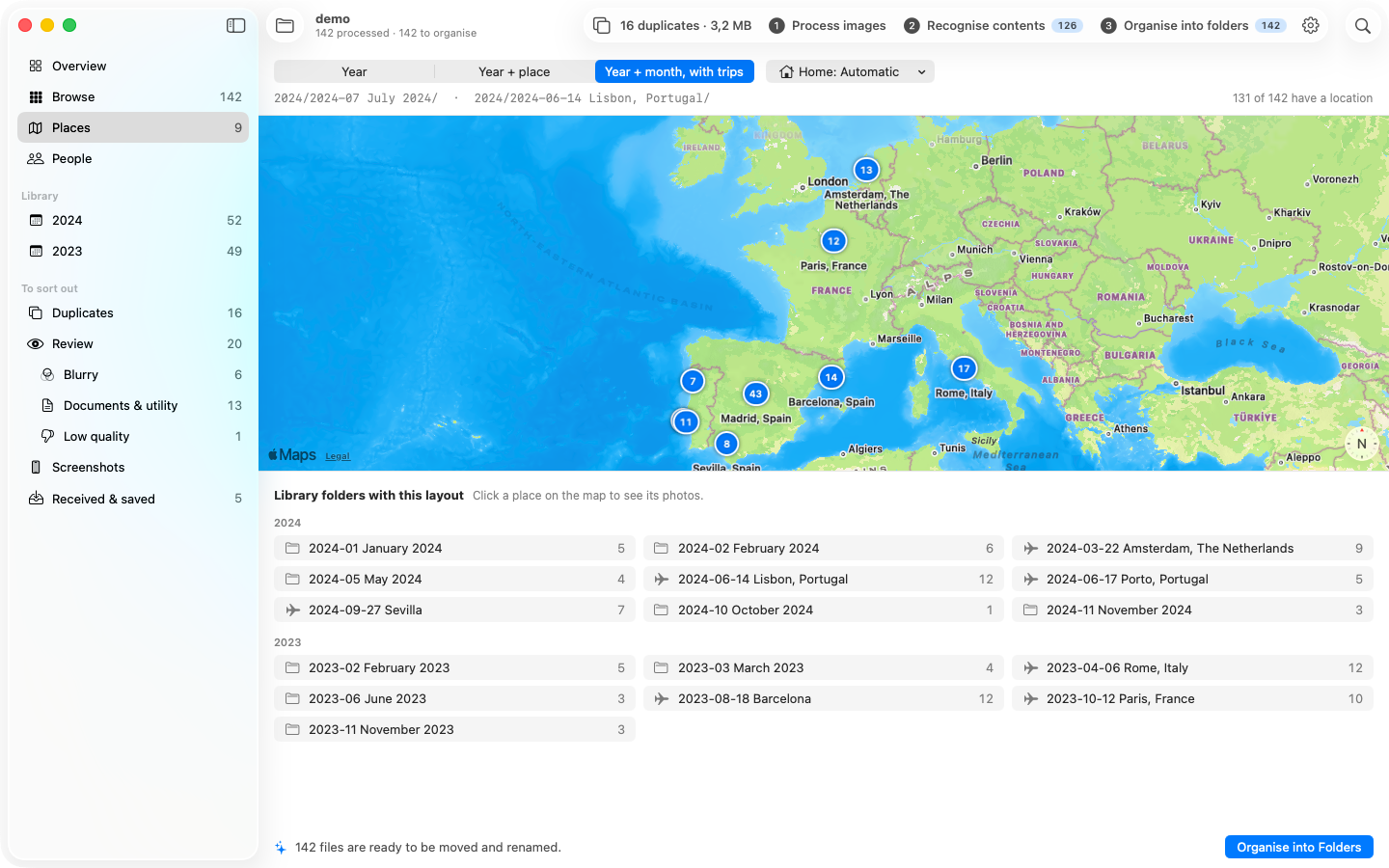
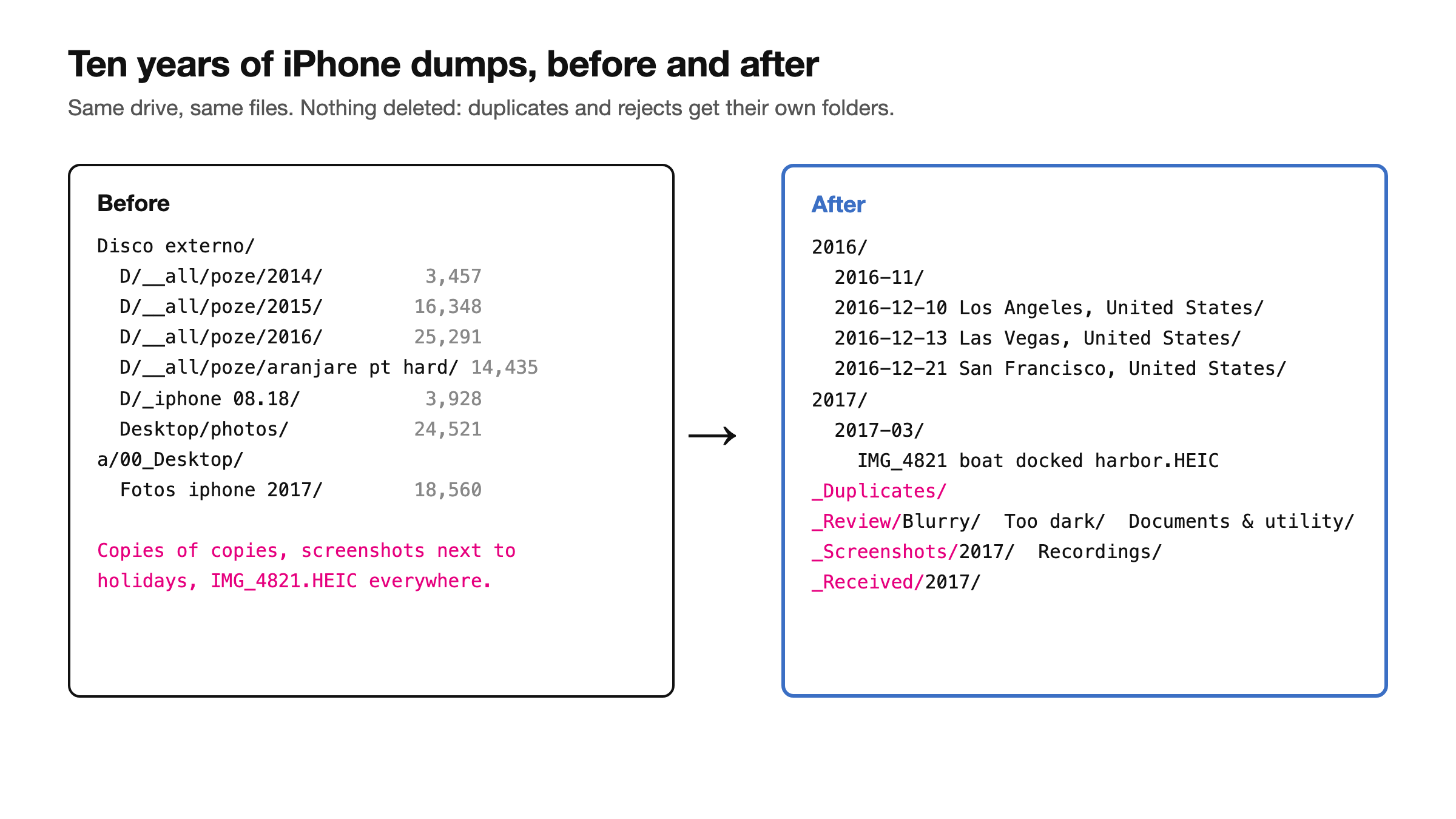
- Library: photos at home go into month folders. Trips get their own folder per city, dated from the day of arrival:
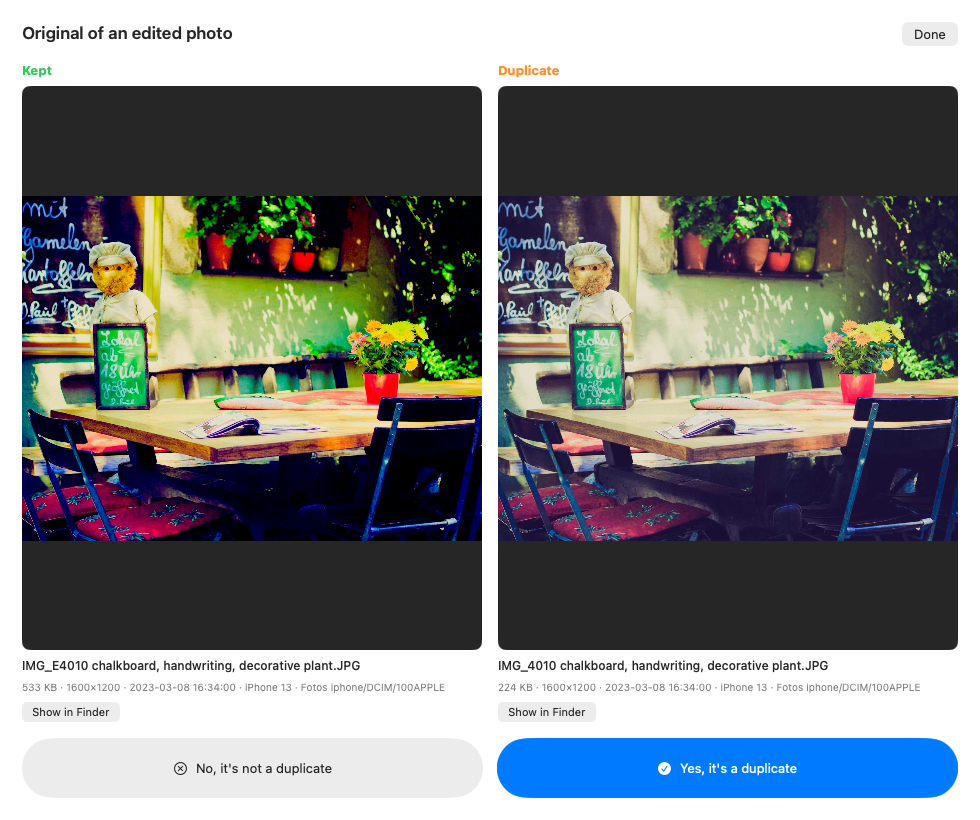
2016-12-13 Las Vegas, United States. - Duplicates, in four kinds: exact copies, the same picture saved again (resized, re-compressed or re-shared), similar shots taken seconds apart, and the original of a photo that was edited later. The best copy stays in the library, judged on resolution, sharpness, exposure and format.
- Review: blurry, too dark, and “documents and utility” (photos of documents and other utility shots).
- Screenshots and screen recordings, and Received for images saved from messaging apps and the web.
- File names keep the original name first, so the order never changes, and add what’s in the picture:
IMG_4821 boat docked harbor.HEIC.
What it got wrong first
None of this worked perfectly the first time, and the bugs were the interesting part:
- Normal videos filed as screen recordings. The rule was “screen-sized and no camera info”. But 1080×1920 is both ordinary Full HD video and the screen of an older iPhone Plus, and videos saved from chats carry no camera info. Recordings are now recognised by name or by sizes that are never normal video.
- Duplicates that weren’t detected. Vision’s image fingerprint changes with the size of the image you give it. The same picture at two sizes scored 0.84 out of 1, under the threshold. Computing every fingerprint at one fixed size brought identical pictures to 0.97 or more.
- The wrong “home”. “Home” was picked automatically as the city with the most days of photos in a year. In 2016 that was Madrid, so a whole trip there ended up in plain month folders. Now there’s a Home setting, and automatic is smarter.
- Countries instead of cities. A trip folder called “Portugal” isn’t much help. Every trip folder is now a city, and one or two photos at a petrol station on the way don’t get their own folder.
- Plenty of photos “undated” even though the date was obvious from the file name. It now reads dates from names when the EXIF data is missing.
The numbers
After gathering every old dump on the drive into one folder and processing it, the totals at the top of this post break down like this:
- 106,560 photos and videos, 320 GB in total,
- 47,144 duplicates taking 110 GB, a third of the drive, each with a better copy that stays,
- 35,050 in the actual library (156 GB),
- 12,171 to review (blurry, too dark, documents),
- 8,845 screenshots and recordings,
- 3,345 images received or saved from elsewhere.
Nothing has been deleted yet. Emptying the exact copies alone gives back a big part of those 110 GB, and the similar shots get a look first.
Trade-offs and what’s next
- It’s Mac-only. Apple Vision is the reason it’s fast and private, and also the reason it doesn’t run anywhere else.
- The drive is the bottleneck. Anything that writes a lot back to a USB hard drive takes minutes. Reading once and working from the SSD is the only reason this is usable.
- “Similar shot” still needs a human. Five photos of the same pose are duplicates for a computer and five different smiles for me.
I might open-source PhotoSma once it settles down. The next posts cover the two parts that made it more than a sorting script: recognising faces and describing every photo with a local model, so you can search “beach sunset” across 100,000 files, and a small Windows version that lives inside the organised folder.
No comments yet