
Over the past few weeks I’ve been working on a scalable infrastructure for a Laravel 9 application using Docker. The main goal was to be able to deploy the application across multiple servers in an orderly and efficient way.
The previous version ran on two EC2 instances behind an Elastic Load Balancer, but they were independent servers: any change made on one had to be repeated by hand on the other, which was a pain and an easy way to introduce mistakes.
With the combination of Amazon Elastic Container Registry + Amazon Elastic Container Service + Fargate you get a serverless infrastructure where Amazon takes care of creating and destroying instances based on what the application needs. You set a minimum number of servers, a maximum (optional but recommended) and the conditions for spinning up new instances (a certain CPU or memory usage).
The first step towards that goal is to dockerize the application. What Docker gives you is a server setup that is explicit and written down in a machine-readable file. Every step needed to configure the server can be understood and reproduced on any Docker installation.
To build the project’s live image I used the learn2torials.com guide, which was the most complete one because it already included instructions for running composer and the scheduler, something most other tutorials left out.
Once the image is built, you check that it works locally and then set up the deployment process for it. I always use buddy.works. All you need is a pipeline with two actions: one that builds the image and pushes it to Amazon ECR, and another that tells Amazon ECS to run a new deployment.
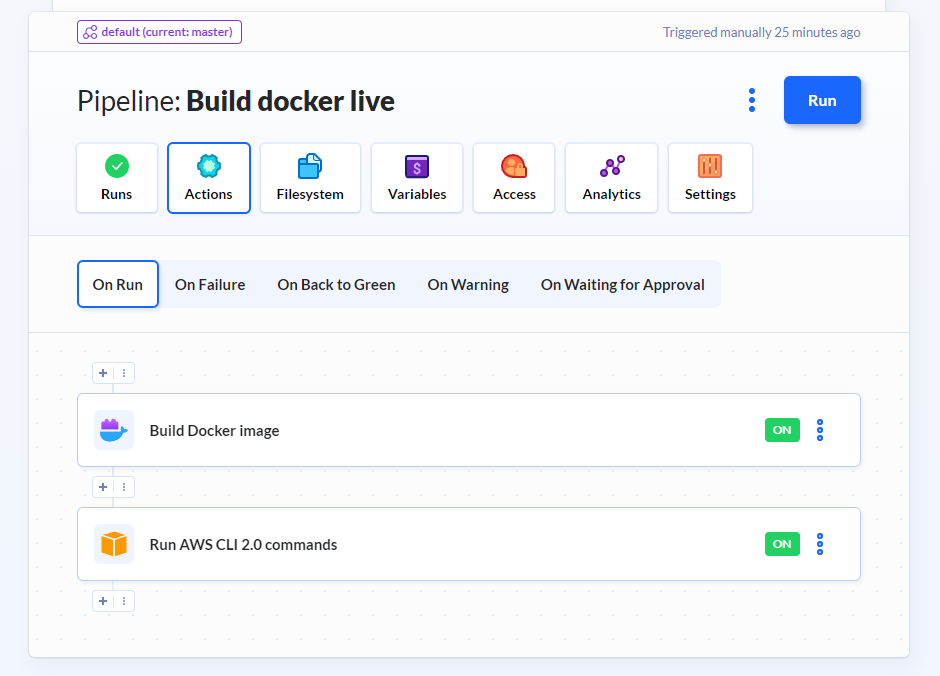
Before configuring Buddy, we need to create a repository in ECR and a cluster in ECS. The repository is where the images will live. ECS is the conductor that creates new servers from the images we’ve selected. The way I understand it, it’s the equivalent of docker-compose, but tied directly into Amazon’s services.
In ECS we create a cluster, which is the way to group a set of containers and servers. ECS calls each server a “Task”, and each rule a “Service”. A service is a set of rules for creating tasks, and a cluster can have several different rules. When it comes to creating tasks, Amazon gives us two options: use regular EC2 instances, or use Fargate to abstract instance creation away completely. If you want a truly scalable infrastructure, Fargate is the way to go, because you don’t have to worry about creating and maintaining instances. It does cost slightly more, though.
The last step, once the service and tasks are running, is to connect everything to an Elastic Load Balancer, enable HTTPS, and the server cluster is reachable from that endpoint. Amazon balances the load across the servers and adds or removes servers as the application’s usage requires.
The result is a highly reproducible and scalable system, although you give up some ease of debugging, deployments are slower because they roll out gradually, and overall complexity goes up.
No comments yet